- DOCXWord, with comments
- SRT · VTTSubtitles
- TXTPlain text
- CSVExcel or a CAT tool
- EN + XXBilingual table
Made for language professionals
Built around the way translators and interpreters work
- Verbatim, or cleanKeeps repetitions, false starts and hesitations. Clean up removes fillers when you need tidy text.
- More than 30 languagesAutomatic detection, plus a mode for recordings that switch languages, such as an interpreted interview in English and Spanish.
- Original and translationEnglish translation side by side with the original, built into the model.
- Your glossaryFinds likely misspellings of your terms, and applies your replacement rules to every new transcript.
- Compare recordingsLine up an original and an interpretation to see what was left out, the lag and the speaking pace.
- SpeakersAutomatic speaker labels that are easy to fix and rename, or one speaker with no label at all.
Edit while you listen
Read, listen and fix in one place
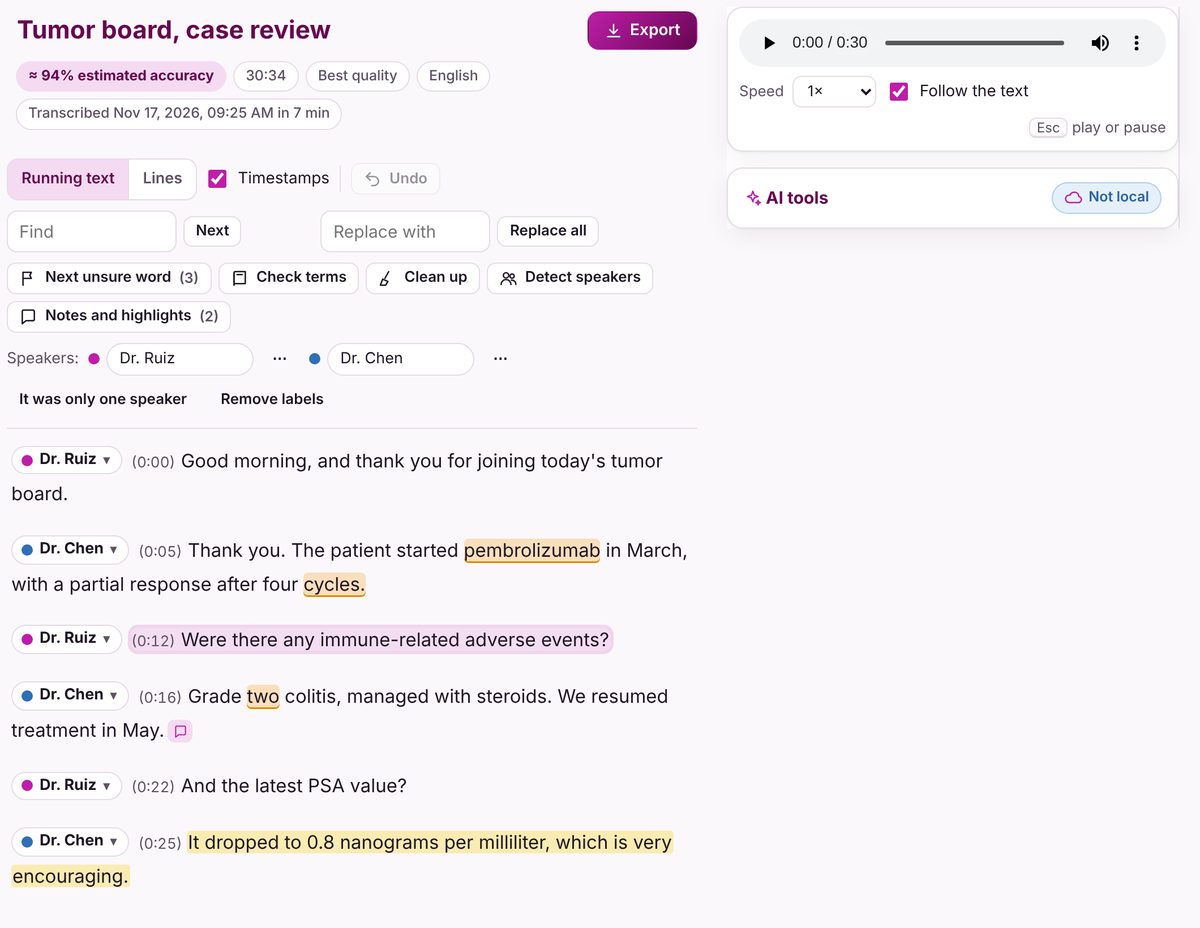
Running text or line by line, with the video playing next to it and the current sentence highlighted. Click any sentence to play it. The words the model was unsure about are marked, with an estimated accuracy for the whole transcript.
Right-click any sentence
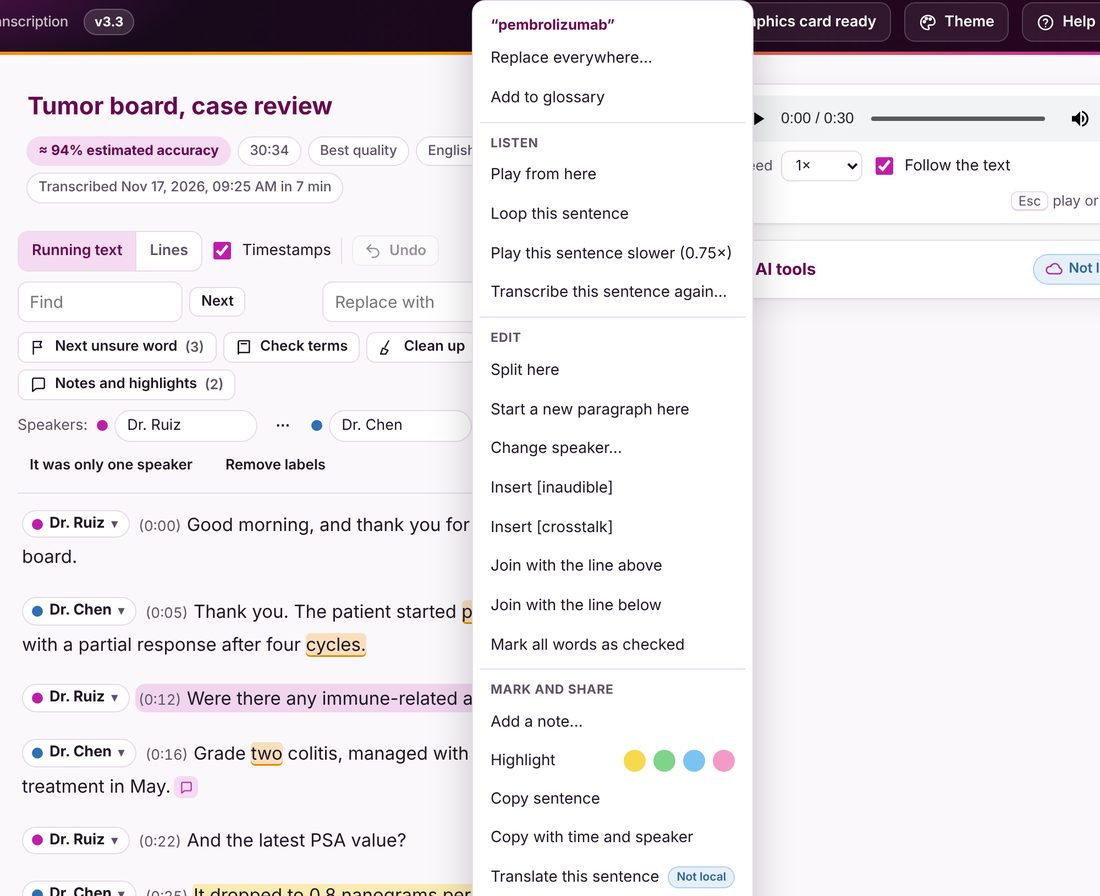
The tools you reach for while you review
- Loop a sentence, or play it at 0.75× speed
- Transcribe just that passage again with a stronger model
- Insert [inaudible] or [crosstalk] with the time
- Split a sentence or start a new paragraph
- Add notes, which become comments in Word
- Highlight quotes in four colors
- Replace a word everywhere, or add it to your glossary
How it works
Three steps, and the second one happens only once
Add a file
Drop audio or video (MP3, WAV, M4A, MP4, MOV, WEBM and more), record your microphone or a browser tab, or paste a Dropbox, Google Drive, OneDrive or podcast link.
The model downloads
The first time you use a quality level, Transcript Desk downloads its speech model, from about 210 MB to 1.6 GB. After that it works offline.
Edit and export
Fix what needs fixing while you listen, then export to Word, subtitles, plain text or CSV.
Two editions
Choose the edition that fits your work
Transcript Desk
$75
One payment, free updates
- Private transcription on your computer, verbatim or clean
- Editor with speakers, timestamps, notes and highlights
- Glossary check, clean up and the right-click tools
- Export to Word, TXT, CSV, SRT and VTT
- Optional cloud tools with your own AI key
Transcript Desk Studio
$109
One payment, free updates
- Everything in Transcript Desk
- Refine subtitle cards and timing on the video, with the Subtitle Refiner rules built in
- Compare the automatic and refined subtitles side by side
- Import SRT files and translate subtitles in context, with your glossary, in the cloud or on your own computer
- Export a video with the subtitles in the picture (MP4)
Already have Transcript Desk? Upgrade to Studio and pay only the difference. One license works on two computers.
Private by design
Your recordings stay on your computer
That makes Transcript Desk a good fit for confidential material: medical, legal and business recordings, client interviews and interpreting practice. Optional cloud tools (summaries, minutes, chapters, translation into other languages and questions about the transcript) use your own Claude, OpenAI or Gemini key. Each one is marked Not local and asks before sending anything. Links are fetched through a server and are marked the same way.
- No limits
- No minute limits, no monthly plan and no daily file count. Transcribe as much as your computer can handle.
- What you need
- A computer with an up-to-date Google Chrome or Microsoft Edge. A graphics card makes transcription several times faster and unlocks the Best quality level; without one, Transcript Desk uses the processor and is slower.
- What you get
- A private link to open Transcript Desk and install it as an app on your computer, a license key that works on two computers, a built-in help guide, and free updates: you are always on the latest version.
- License
- For your own personal professional use.
Transcribe your next recording privately
Open the link in Chrome or Edge, try a sample, then drop your own file. The Help button explains every option.
Compare the editionsFrom $75, one payment. Free updates.