What it does
One place for every prompt you use
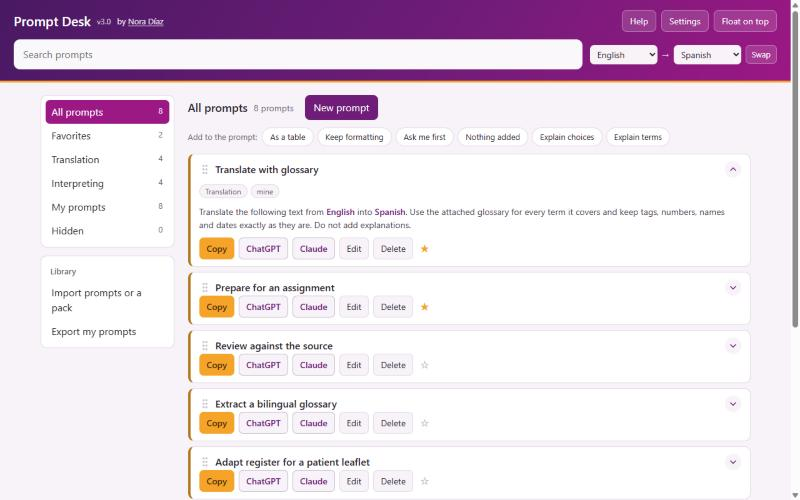
- Organized the way you workTranslation, Interpreting, Follow-ups, Favorites and My prompts, plus any collection you create.
- Your languages, filled inEvery place a prompt asks for your working languages is filled in from your language pair. More than 40 languages, plus any you add, including regional varieties.
- Fill-in fields from square bracketsAnything in brackets, such as [TOPIC] or [AUDIENCE], becomes a field, and Prompt Desk remembers the answers you use often.
- Prompt packsImport ready-made collections, filter by pack, or find a pack by name.
- Write or adaptWrite prompts from scratch, or start from any prompt and make it yours.
- Keep it tidyStar favorites, hide what you do not need, drag prompts into your own order, color the collections the way you like.
Built for the way you work
Right beside the chatbot
Float on top
A small window that stays above
It sits above your other windows, right beside the chatbot, and shrinks to a badge when you need the space. Chrome or Edge.
Install it
Opens like any other app
Install Prompt Desk from Chrome or Edge and it gets its own window and icon on your desktop or taskbar.
Private by design
Your prompts live in your browser, on your computer
- Nothing is uploaded and there is no account to create
- Export the prompts you write whenever you want a backup
- Move to another computer by importing that file
- Runs in the browser on Windows, Mac and Linux
- Copies the finished prompt, so it works with every chatbot
Questions
Before you buy
- Does it come with prompts?
- Prompt Desk is the app that holds and fills in your prompts. It opens empty, ready for the prompts you write or for any prompt pack you import.
- Which chatbots does it work with?
- All of them. Prompt Desk copies the finished prompt, and you paste it wherever you work.
- Does it work on a Mac?
- Yes. It runs in the browser on Windows, Mac and Linux. Float on top needs Chrome or Edge.
- Can I use it on more than one computer?
- Yes. Enter your key in each browser you use. Your prompts do not sync on their own; use Export my prompts on one computer and import the file on the other.
- Does it need an internet connection?
- Only the first time you enter your key; after that it checks the key quietly about once a week. You can add and edit prompts without a connection, but the chatbot you paste them into needs one.
- How you get it
- After purchase you receive a license key and a link to the app. Paste the key once, and Prompt Desk opens in that browser from then on.
One purchase, no subscription
Get your license key, paste it in once, and keep your prompts one click from the chatbot.
Get Prompt Desk$9.99