Source packs
- MedicalNCI, MeSH, ontologies, ICD-10-CM
- LegalIATE, DPEJ, EUR-Lex, UNTERM
- Business and financeIATE, IMF, IFRS, Investopedia
- Technical and patentsIATE, Electropedia, WIPO Pearl
- EnvironmentIATE, AGROVOC, GEMET, EPA
- GeneralIATE, TERMIUM, WordReference
- Your ownGlossaries, links and packs
Sources
Specialized sources included, and room for your own
Sources chosen for each specialization
Every pack searches IATE, Wikidata and Wikipedia inside the app. The Medical pack adds the NCI Dictionary of Cancer Terms, MeSH, the HPO, Mondo and Orphanet ontologies, ICD-10-CM and Europe PMC. Each pack also opens the references of its field in a new tab with your term: DPTM, Libro rojo, mugüMED and DeCS for medicine; DPEJ, EUR-Lex and UNTERM for law; Electropedia, WIPO Pearl and patent databases for technical work.
Add what you already rely on
Import your own glossaries, add a link to any dictionary or database that has a search address, and switch sources on and off. Build a pack for your own specialization, save it as a file and share it with a colleague or a class, who can import it in one step.
What it does
One search box for your terminology research
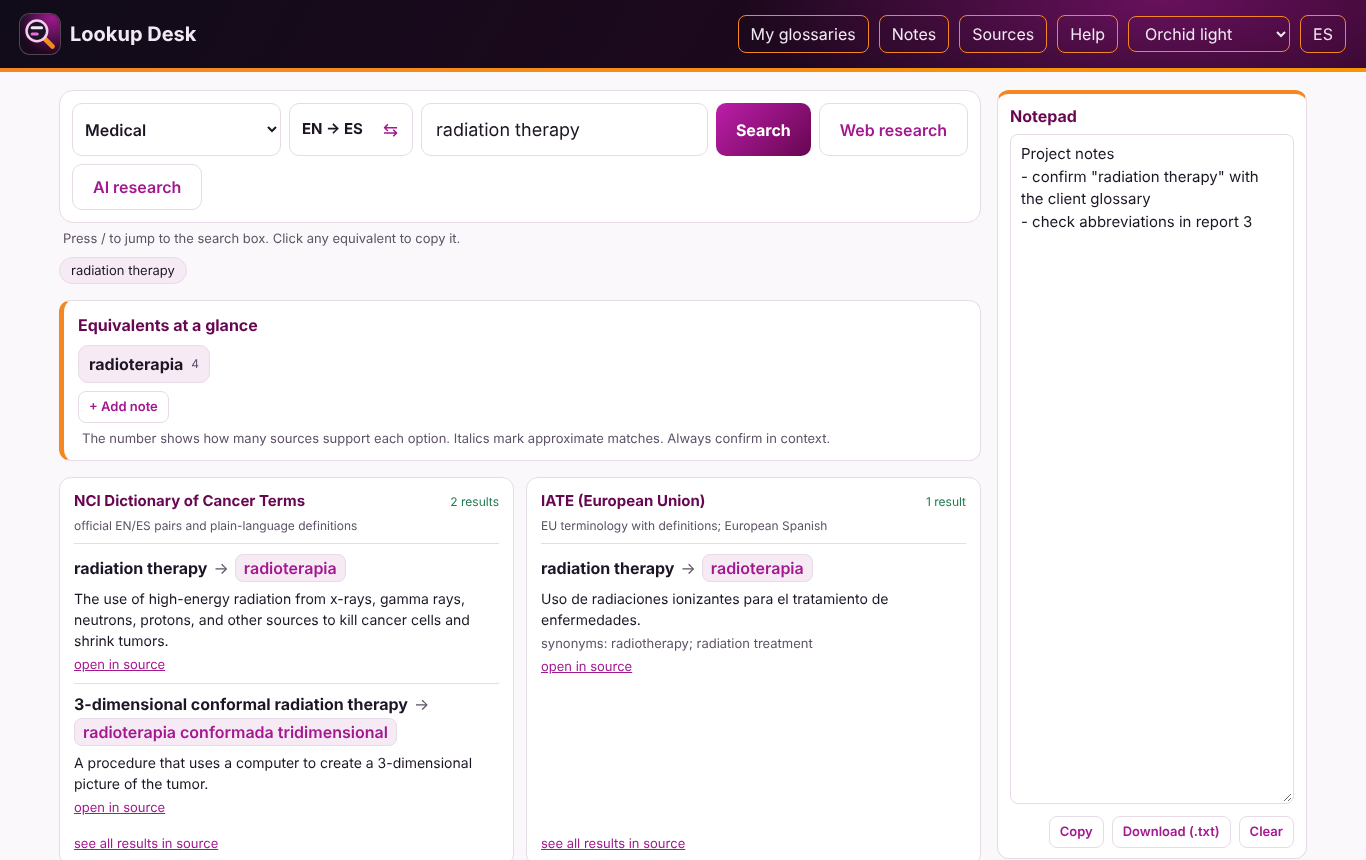
Each source answers in its own card, with a link back to the original entry.
- Equivalents at a glanceA top panel gathers the equivalents the sources propose and shows how many sources agree. Click one to copy it.
- Source packs by specializationSwitch between Medical, Legal, Business and finance, Technical and patents, Environment, and General. Each pack brings its own sources and links.
- Your glossaries firstImport your own glossaries as CSV, TSV or TBX. Their matches always appear first.
- Your own links and packsAdd any site that has a search address, adjust a pack to your work, and export it as a file to share with colleagues.
- Web research on trusted sitesA plain search with no AI, limited to reputable sites for the pack you chose, such as agencies, academies, courts and journals.
- AI research with guardrailsA ready prompt for the AI assistant you already use. It requires a link and an exact quote for every claim, and "not found" in place of a guess.
- Notes and a notepadSave a note for a term and see it again the next time you search that term. A notepad stays on screen for everything else.
- Installs like an appInstall it from Chrome or Edge, pick a color theme, and use the interface in English or Spanish.
How it works
Three steps, no setup
Open the app
Lookup Desk runs in your browser. There is nothing to install and no account to create.
Type a term
Pick English to Spanish or Spanish to English and press Enter. The sources answer within a few seconds.
Compare and decide
Read the cards, copy the equivalent you choose and keep a note for next time.
Private by design
Your glossaries and notes stay in your browser
- No account and no server of mine in the middle
- Each search goes straight from your browser to the public sources
- Glossaries, notes and settings are stored on your device only
- Download your notes as a text file whenever you want a backup
- Runs in the browser on Windows, Mac and Linux
Questions
Before you start
- Which languages does it cover?
- English and Spanish, in both directions. The interface is available in both languages too.
- Which specializations does it cover?
- It comes with packs for medicine, law, business and finance, technical work and patents, and the environment, plus a general pack. The Medical pack has the most sources that answer inside the app. The other packs answer from IATE, Wikidata and Wikipedia and open the specialized references of each field in a new tab.
- Can I add my own sources?
- Yes. Import your glossaries, add links to the sites you use, and build or import a pack for any other specialization.
- Does it replace my dictionaries?
- No. Lookup Desk is a research shortcut. Open sources vary in quality, so confirm every term in context and in the references you trust.
- Does it include subscription resources such as Libro rojo or mugüMED?
- No. Lookup Desk opens them in a new tab and copies your term so you can paste it, and you need your own subscription.
- Does it use AI?
- The search itself does not. The AI research button only writes a prompt that you send to your own assistant, such as Claude, ChatGPT or Perplexity.
- Which glossary formats can I import?
- CSV, TSV and TBX. From Excel, save your glossary as CSV with English in the first column and Spanish in the second.
- How much does it cost?
- Nothing. Lookup Desk is free. Open it in your browser and bookmark it, or install it as an app from Chrome or Edge.
Free to use
Open Lookup Desk, try a term from your current project and keep it if it helps.
Open Lookup DeskNo account and nothing to install.